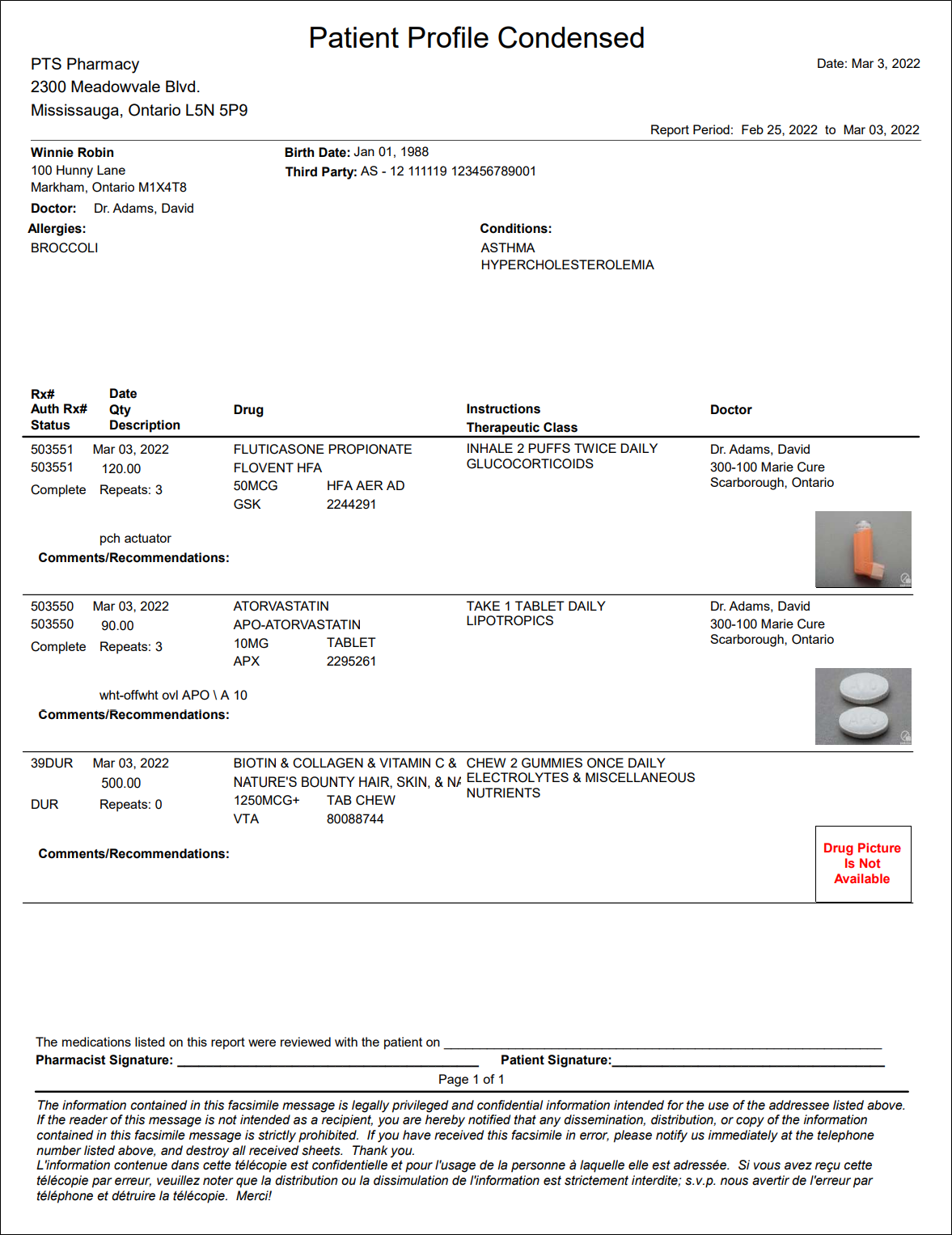
Patient Profile Condensed Report
The Patient Profile Condensed report lists prescriptions on the patient's Profile that were last filled within the report period. This report can be used when doctors request information about a patient's current medications.
Active DUR records and Long-Term Care prescriptions with the following Group Rx Statuses always print on the report, regardless of the report period:
| P - First Fill Print Only | C - First Fill Print Only External |
| G - Active Government Regular Dose | N - Active Government Non-Drug |
| R - Active Government PRN Dose | V - Active Government External |
| T - Active Treatment |
The Patient Profile Condensed report can be filtered and saved in Preview. Filter provides the ability to filter the report based on doctor, drug, or prescription attributes.
 Criteria
-
Start Date and End Date - determines the date range for the report.
-
Patient - the report generates for the patient that is entered. This is a required field.
-
Doctor - the report lists prescriptions prescribed by the doctor that is entered. When no doctor is entered, the report lists prescriptions for the report period, regardless of doctor.
Extended
-
Active Rx's Only - the report only includes prescriptions and DUR records where the Active flag in the Profile is on. If Active Rx's Only is not selected, the report lists all prescriptions that were last filled within the report period, as well as all inactive DUR records that have a Performed On Date within the report period (all active DUR records continue to be included, as well as the Group Rx Statuses listed above).
-
English Only - the report prints instructions for each prescription in English, instead of the language set in Rx Detail.
-
Medication Review Format - the report includes a Comments/Recommendation area for each prescription. The last page of the report indicates 'The medications listed on this report were reviewed with the patient on _____' (a blank line on which the pharmacist can write the date), as well as space for the patient and pharmacist signatures. Ontario pharmacies can use the Medication Review Format when performing a MedsCheck.
-
Group DUR Together - the prescriptions on the report are Grouped together, followed by all DUR records. The selected Sort Options are applied within each Grouping.
-
Print Privacy Disclaimer - the report includes an English and French privacy disclaimer at the bottom.
-
Include Drug Pictures - the report includes the drug pictures for each prescription. If there is no picture available in the Drug Folder, the following message appears: 'Drug Picture Not Available.' If there is no colour printer, the picture prints in black and white.
Sort Options
-
Date - the report is sorted by Date, with the most recent Fill Date or Performed On Date at the top. Within each date, the prescriptions are listed by Rx# in descending order, so the prescription with the highest Rx# is listed first. This is the default sort option.
-
Doctor - the report is sorted alphabetically by doctor. Within each doctor, prescriptions are sorted by Date, following the Date sort option above.
-
Drug Generic Name - the report is sorted alphabetically by drug generic name, strength, and form. Within each drug, prescriptions are sorted by Date, following the Date sort option above.
-
Drug Trade Name - the report is sorted alphabetically by drug trade name, strength, and form. Within each drug, prescriptions are sorted by Date, following the Date sort option above.
-
Rx# - the report is sorted by Rx# in descending order (the prescription with the highest Rx# is listed first). This ensures all regular prescriptions are Grouped together, as are all narcotics, government prescriptions, and DUR records. DUR records are listed after the prescription records, in order of the DUR number (i.e. 123DUR).